 paper2epub
k2pdfopt, Calibre or EPUB? The ways to read a PDF paper on an e-reader
A scientific paper is laid out for an A4 or Letter page: two columns, ten-point type, equations and tables placed wherever they fit. An e-reader’s screen is a fraction of that. There are five ways to bridge the gap, and none of them is perfect, mine included. Here’s how they compare.
1. Read the PDF as it is
Every e-reader opens PDFs. You get the whole page shrunk to fit, and from there you zoom, pan, turn the screen sideways or crop the margins. That’s fine for checking a figure, and tiring for twenty pages.
A bigger screen helps. On a ten-inch e-reader, a single-column paper is readable as it is. Two columns are still small.
Good for: a quick look, scans, and anything where the exact page matters.
2. k2pdfopt
k2pdfopt has been around for more than a decade, and it’s clever. It finds the columns and the lines of text on each page and lays them out again, as pieces of the page, in a new PDF sized for your screen. Because it moves pixels around instead of reading the text, it can’t misread anything, and it handles scanned papers too, with optional OCR. KOReader uses the same engine to reflow PDFs on the device.
The catch is that the result is still a PDF made of strips of the page. The type size is fixed when you convert, so for bigger text you convert again, and your e-reader’s font settings don’t apply. You also need to tell it about your screen, and it’s a desktop program.
Good for: scans, and when you want the original typesetting exactly.
3. Calibre
Calibre converts almost anything into almost anything, PDF to EPUB included. But its own manual is frank about this one: PDF is “one of the worst formats to convert from”, multi-column documents “are not supported”, and math typesetting “will not convert correctly”. In practice, a two-column paper comes out with its columns mixed up, its equations as strings of loose symbols and its tables flattened into lines of text.
Good for: novels and other single-column PDFs.
4. arXiv’s HTML version
For most recent papers, arXiv has an HTML version next to the PDF, made from the LaTeX source. It reflows, its math is real math, and in the browser on a tablet or a phone it reads well. It’s still labelled experimental, though, and some papers come out with parts missing. Only arXiv papers that came with their LaTeX source have one, and it’s a web page, so getting it onto an e-reader takes another step.
Good for: reading on a tablet or a phone, when the paper is on arXiv.
5. Rebuild the paper as an EPUB
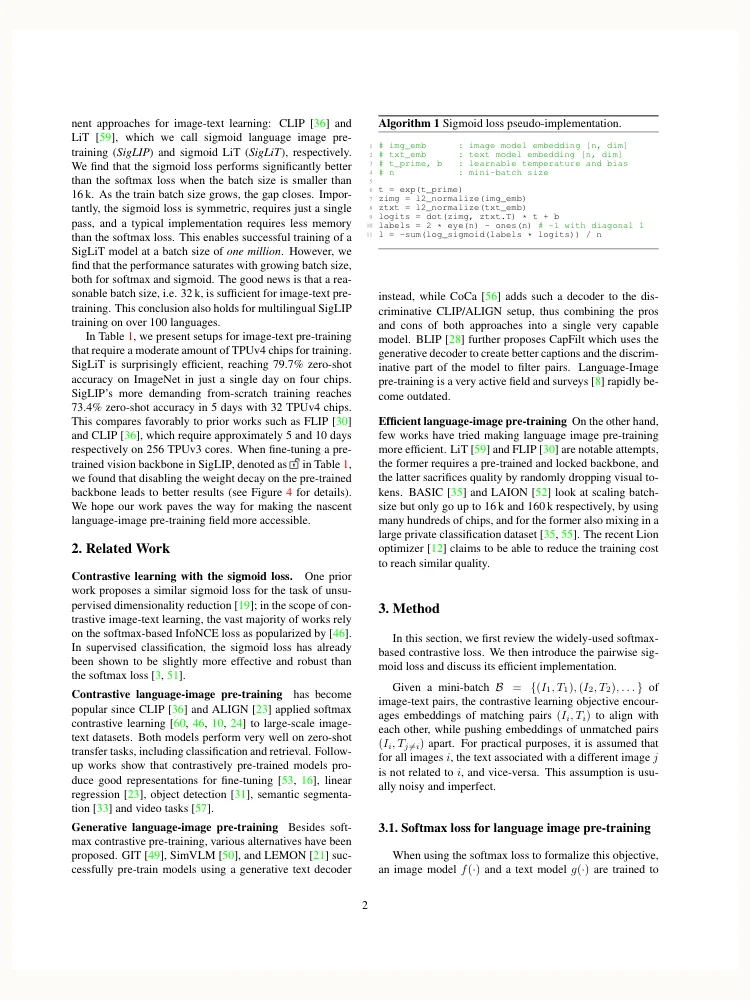
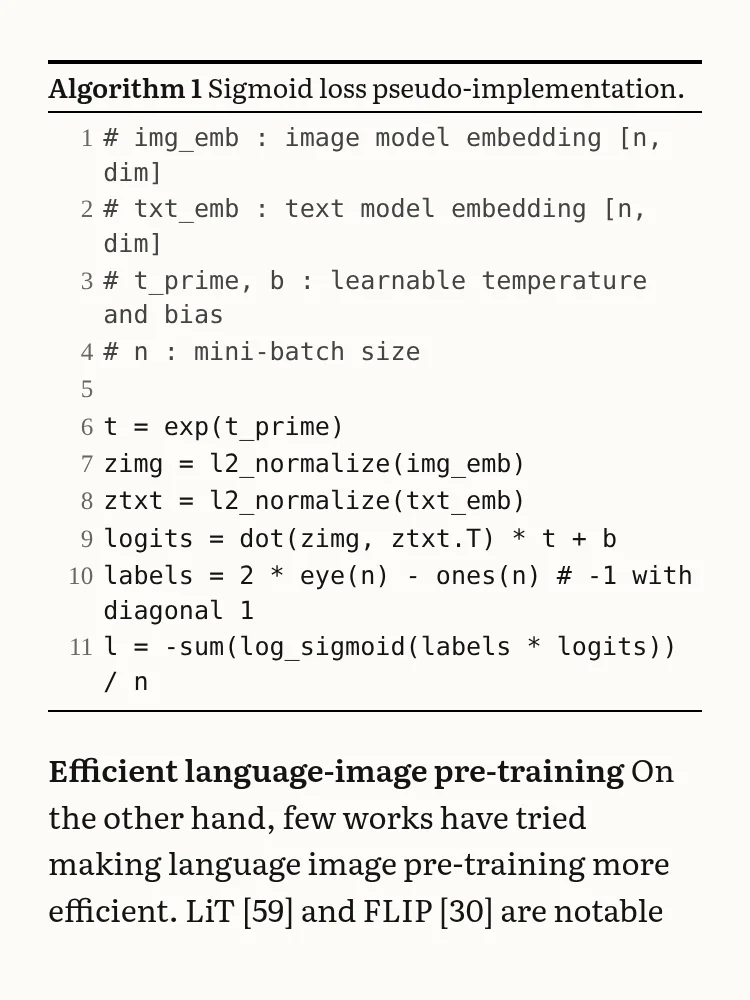
This is what paper2epub does. It reads the text the PDF already contains, without OCR or a language model, and works out its structure: which lines are headings, paragraphs, captions, footnotes or references. Then it rebuilds the paper as a book. Equations are typeset again with LaTeX, tables become HTML tables, figures are cropped with their captions, and citations, footnotes and cross-references become links. The EPUB reflows like any e-book, at the size you choose.
The PDF
The EPUB
The flip side is the one k2pdfopt doesn’t have: rebuilding means it can get things wrong. When an equation can’t be read with confidence, it keeps a crop of the original instead, and so does a table too wide for the screen. Tables with merged cells can come out with their columns shifted, and an unusual layout can still trip up the structure. It needs a PDF with real text in it, so scans are out. And it’s new, while k2pdfopt has years of fixes behind it.
Good for: papers that were born digital and that you want to read like a book.
Side by side
| Text reflows | Type size | Equations | Scans | |
|---|---|---|---|---|
| The PDF as it is | No | Zoom only | As in the paper | Yes |
| k2pdfopt | As strips of the page | Fixed when converting | As in the paper | Yes |
| Calibre | Yes | Yours to choose | Usually broken | No |
| arXiv HTML | Yes | In the browser | Real math | No |
| paper2epub | Yes | Yours to choose | Typeset with LaTeX | No |
If the paper is a scan, or the page has to look exactly like the original, use k2pdfopt. For everything else I’d rebuild it, but I made the tool, so take that with a pinch of salt: try both on a paper you know well and see which one you’d rather read.
For the practical side, there are step-by-step guides for the Kindle and the Kobo.