 paper2epub
From the LaTeX source to EPUB with pandoc: what happens to an arXiv paper
Ask how to get an arXiv paper onto an e-reader and someone will say: don’t touch the PDF, arXiv has the LaTeX source, convert that with pandoc. It sounds right. The source has every equation written in LaTeX, every section and every reference, with nothing to guess from positions on a page. So I tried it on a real paper and looked at what comes out.
The test: Direct Preference Optimization (Rafailov et al.), the same paper as in the comparison with Calibre. Its source as arXiv serves it (version 3), pandoc 3.9 with the command everyone suggests, pandoc main.tex -o dpo.epub, and then again with --mathml. On the other side, paper2epub on this site, from the PDF. Both books shown with the same font and size on the same six-inch screen.
Getting the source
On the paper’s arXiv page, TeX Source (under Access paper) downloads a compressed archive. Inside are the .tex files, the style files of the conference, the figures and, here, a main.bbl. You have to find the main file yourself (here main.tex, which pulls in commands.tex), install pandoc and run it from that folder. Not hard, but it’s a terminal job, and it only works when there is a source: papers submitted as a PDF (written in Word, for instance) have none, and journal articles almost never come with one.
Equations
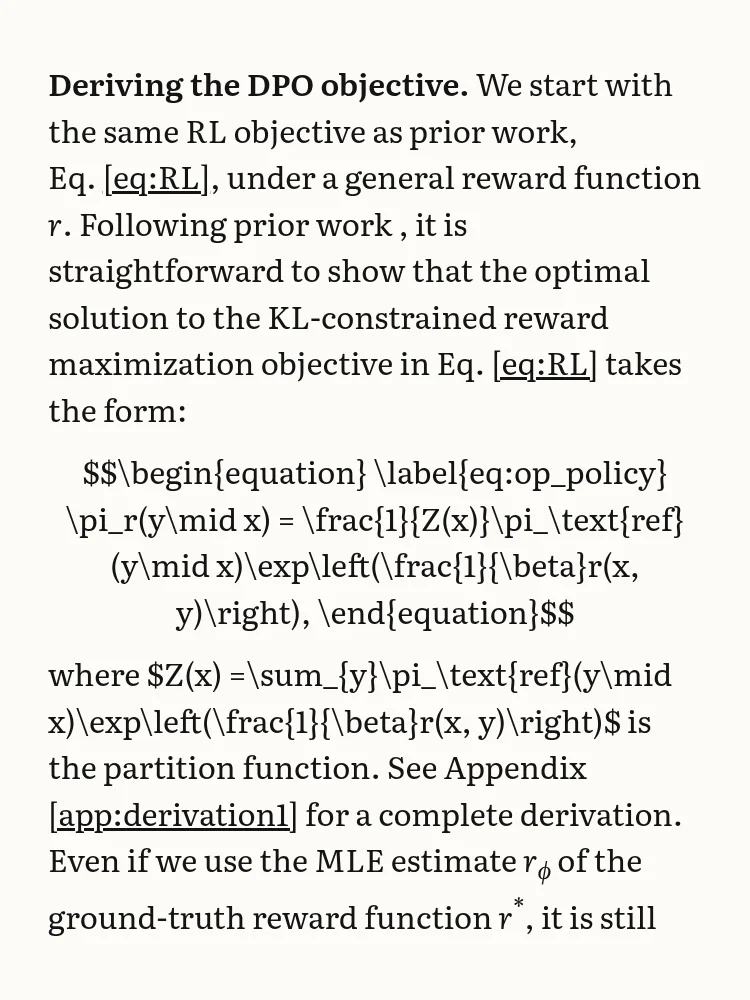
This is the passage that introduces the paper’s main equation, on page 4.
pandoc
paper2epub
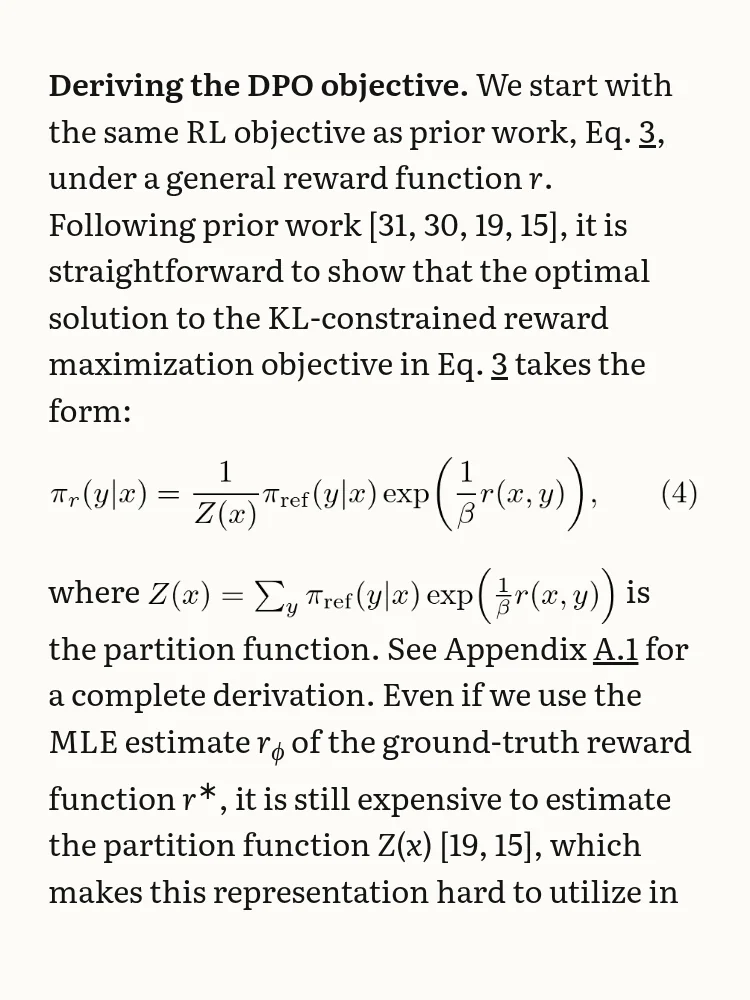
By default, pandoc writes the math of an EPUB as plain text: letters in italics, subscripts and superscripts. That works for rϕ, but not for a fraction. Whatever it can’t write that way stays as the LaTeX it came from, dollar signs and all. In this paper that’s 29 of the 32 displayed equations and 14 inline formulas: almost all of the maths.
With --mathml, pandoc writes them in MathML, the standard for maths in web pages and e-books, and only one equation fails. How it looks then depends on the reader. Amazon says its Enhanced Typesetting supports MathML, and Kobo lists it as supported on its e-ink readers, but readers on forums report mixed results with complex equations. I couldn’t try it on a device, so I won’t show it. paper2epub doesn’t depend on that: each formula is typeset with LaTeX into a picture, which every e-reader shows.
Citations and references
The source has no .bib file: like many arXiv sources, it only ships the main.bbl that LaTeX compiled, and pandoc doesn’t read it. So the paper’s 58 citations disappear. Where the PDF says “Following prior work [31, 30, 19, 15], it is”, the EPUB says “Following prior work , it is”. And there’s no list of references at the end.
Cross-references fare a little better: they’re links, but 38 of them show the internal label instead of the number. “Eq. [eq:RL]” is equation 3, and “Appendix [app:derivation1]” is A.1. Several also lead nowhere: the links that jump from one chapter to another point at anchors that aren’t there.
With pandoc, --citeproc and the .bib would fix the citations, if you had the .bib. paper2epub takes them from the PDF, which has them already numbered: each one is a link to its entry in the bibliography (91 links to 51 entries in this paper).
Figures
DPO’s figures are made of eight pictures, and six of them are PDF files: every plot of results. pandoc puts them in the EPUB as they are. But PDF isn’t one of the image formats an EPUB can count on (JPEG, PNG, GIF, SVG, WebP), so the rules ask for a fallback, which pandoc doesn’t add. The three figures with the results are left without anything an e-reader can show. Converting them first to PNG, one by one, would fix it. paper2epub crops the figures from the PDF’s page, so a plot drawn as a PDF is like any other.
The validator
epubcheck is the reference validator for EPUB files, the one bookshops run before accepting one. On pandoc’s book it reports 40 errors: the 34 links that lead nowhere and the 6 PDF pictures. On paper2epub’s, none.
Where pandoc is the better choice
pandoc isn’t a bad tool. It’s a general one, and it shines when the source is yours: you have the .bib, the figures as PNG or SVG, and you can pass --citeproc and --mathml and fix the rest by hand. The tables of this paper, for instance, came through as real tables, with only a stray “2-3” where a rule spanned two columns. If you write your own papers in LaTeX or Markdown, it’s worth learning.
For someone else’s paper, downloaded from arXiv to read on the train, the LaTeX source isn’t the shortcut it seems. It’s an archive to unpack, a program to install, and a book where the maths, the citations and the plots need fixing. The PDF, on the other hand, always exists and has all of it already laid out. That’s what paper2epub starts from.
To see the other ways of reading a paper on an e-reader, side by side, there’s k2pdfopt, KOReader, Calibre or EPUB?